CPA Networks
 Ad Networks
 Affiliate Programs
 Offer base



Google Display Network spans over 2 million websites and apps, reaching 90% of internet users worldwide, but your ad only appears where your banner size fits the available slot. Upload the wrong dimensions, and you’re simply not in the auction. The AffRoom team put together this guide to cover every relevant google display ad size, technical requirements for image assets, and practical logic for deciding which formats to prioritize in your campaigns.
AffRoom is a catalogue of affiliate marketing companies with verified listings, honest reviews, and direct messaging between affiliates and networks.

What Google Display Ad Sizes Are Available?
Google technically supports dozens of google ads dimensions, but in practice, around 9-10 formats cover the overwhelming majority of available inventory. The rest either appear on a narrow slice of legacy publishers or have been quietly deprecated. Knowing which sizes are actually in rotation matters. An ad in a format that barely exists in the wild is just a budget that doesn’t spend.
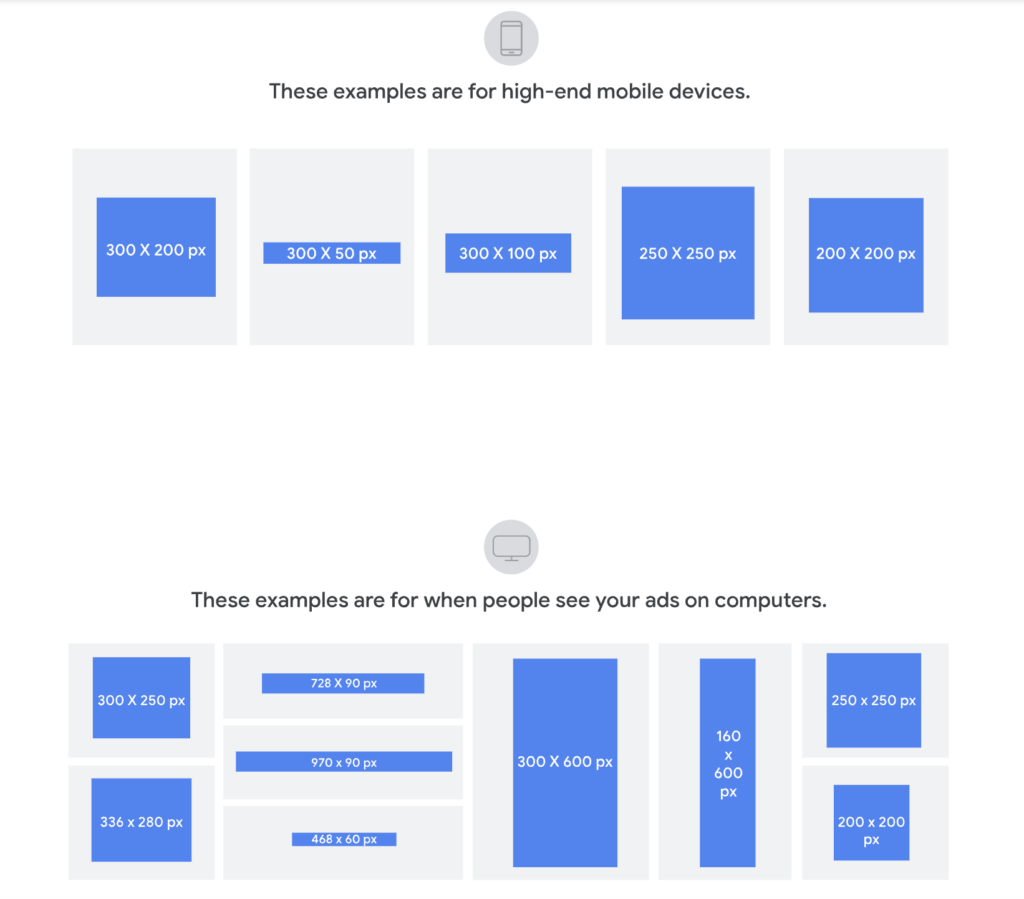
The table below covers every format worth knowing, with device context and the type of placement each one typically fills.
| Size | Name | Device | Usage |
| 300×250 | Medium Rectangle | Desktop / Mobile | Most widely supported; fits sidebars and in-content placements across virtually all publishers. |
| 728×90 | Leaderboard | Desktop | Page headers and footers; high visibility on content-heavy sites at page load. |
| 160×600 | Wide Skyscraper | Desktop | Right-rail sidebars; stays in the viewport during scrolling. |
| 336×280 | Large Rectangle | Desktop | In-content placements; larger visual footprint than 300×250. |
| 300×600 | Half Page | Desktop | High-impact sidebar unit; premium inventory, limited but effective. |
| 320×50 | Mobile Banner | Mobile | Standard mobile top/bottom bar; high reach, low CPM. |
| 320×100 | Large Mobile Banner | Mobile | Double-height mobile unit; more space for CTA and creative. |
| 970×90 | Large Leaderboard | Desktop | Wide-format header; less common, strongest on premium publishers. |
| 970×250 | Billboard | Desktop | Standard uploaded size; less common inventory than core formats, typically associated with premium header placements. |
| 468×60 | Banner | Desktop | Legacy format; was the header standard until widescreen monitors shifted publisher layouts toward 728×90. Technically supported, but inventory is too thin to justify a dedicated creative. |

Which Banner Sizes Perform Best?
Three google display ad sizes consistently dominate GDN inventory: 300×250, 728×90, and 300×600. They appear on more publisher layouts than any other format. But “most available” and “best for your campaign” aren’t always the same thing.
- 300×250 fits sidebars, in-content blocks, and interstitial slots across nearly every publisher. The trade-off is that it’s the most competitive slot in display advertising, so CPMs are higher and standing out creatively is harder.
- 728×90 loads at the top of the page, which makes it strong for brand awareness but weaker for direct-response. The horizontal format leaves little room for a CTA, so it works better as an impression vehicle than a conversion driver.
- 300×600 gives you more visual space and high viewability on premium publishers. The limitation is that not all networks carry significant inventory for it, and the CPM reflects that scarcity.
- 320×50 and 320×100 cover most mobile GDN traffic. The 320×50 is a volume play with low CPM; the 320×100 doubles the height and gives you actual room for a logo and CTA. For offers where the conversion is a single tap, the 320×100 tends to outperform on CTR without a dramatic cost increase.
Google Ads Image Dimensions and File Requirements
Google rejects banners for two reasons: policy violations and technical errors. The second category is more common than people expect, and it’s entirely avoidable. Here’s what the system actually checks before your ad goes live.
- Supported file formats. Static banners can be uploaded as JPG, PNG, or GIF (Flash/SWF has not been supported since 2017). For animated creatives with richer interactivity, HTML5 is the standard, uploaded as a .zip file.
- File size limit. The maximum is 150 KB for static image files. HTML5 .zip files follow the same 150 KB cap, with additional restrictions on the number of external requests the banner can make after load. High-resolution PNGs at larger sizes frequently hit this limit, so run them through a compression tool before upload.
- Animation rules. Animated GIFs and HTML5 banners must not exceed 30 seconds in total animation length. Looping is allowed, but auto-playing animations that loop continuously are capped at three cycles before they must stop.
- Image quality. Banners must be uploaded at exact pixel dimensions, no upscaling. A blurry or visually degraded creative will fail review.
- Minimum dimensions for Responsive Display Ads. Google requires at least 600×314 px for landscape images (1.91:1 aspect ratio) and 300×300 px for square images (1:1 aspect ratio). Both formats are recommended for maximum placement coverage across the network.
- Text area limit. Text and logos must not cover more than 20% of the banner’s total area. Ads that exceed this threshold are frequently rejected during review, even when the copy itself is policy-compliant.
How Do You Choose the Right Format?
Picking a banner size isn’t a design decision. It’s a function of where your audience is, what you want them to do, and which publishers you’re buying on.
- By device split. Check your analytics before touching the campaign. If mobile accounts for more than 60% of your traffic, the 320×50 and 320×100 need to be in the set. For desktop-heavy audiences, 300×250 and 728×90 are the baseline; 300×600 is worth adding when budget allows.
- By campaign goal. Larger formats get more attention but appear less frequently, since there are simply fewer placements for them. For brand campaigns, 728×90 and 300×600 give you high visibility per impression. For direct-response, 300×250 and 320×100 give you broader distribution at a lower CPM.
- By publisher tier. Premium publishers, think established news sites and vertical media, commonly support 300×600 and 970×90. Long-tail publishers almost universally carry 300×250 and 728×90, and often nothing else. If your placement targeting is broad, design for the formats that travel across both tiers.
For Responsive Display Ads specifically, Google recommends uploading at least five images and five headlines to maximize the number of combinations it can serve. For static banners, there’s no official minimum, but the more google ad sizes you cover, the more inventory slots you’re eligible for. One size means you’re excluded from every placement that doesn’t carry it. That’s not a minor gap.
How Do You Test Banner Sizes Without Wasting Budget?
No ranking of google display ad sizes tells you how your specific audience responds to each one. That’s what testing is for. A few rules that hold regardless of vertical or GEO:
- Run RDA and static in parallel, not sequentially. Responsive Display Ads let Google auto-assemble creatives from your uploaded assets. It’s fast to launch, but you lose control over which headline pairs with which image. Static banners give you full control. Running both at the same time gives you an actual comparison.
- Don’t change the creative and the size at the same time. If you swap both variables simultaneously, you won’t know which one drove the result.
- Set a minimum threshold before drawing conclusions. At least 7 to 14 days and 1,000 impressions per format. Anything less and you’re optimizing against noise.
- Treat Google’s RDA recommendations with some skepticism. Google regularly pushes advertisers toward Responsive Display Ads, which is also more convenient for its own automated optimization. That’s not always aligned with what’s best for your campaign specifically.
FAQ: What People Also Ask About Google Display Ads Sizes?
What are the most common Google display ad sizes?
The three formats with the widest inventory coverage are 300×250, 728×90, and 160×600. Add 320×50 if mobile accounts for a significant share of your traffic.
What is the recommended Google Ads banner size?
Google highlights 300×250, 728×90, and 300×600 as the strongest performers. In practice, skipping 320×50 on mobile campaigns means leaving a substantial portion of impressions on the table.
What image dimensions are required for Google display ads?
Banners must be uploaded at exact pixel dimensions with no upscaling, and file size must stay under 150 KB. See the Image Requirements section above for format-specific details.
Which Google display ad sizes perform best?
It depends on what you’re optimizing for. For retargeting and direct-response, 300×250 consistently delivers the highest impression volume. For brand campaigns on premium placements, 300×600 wins on viewability. Mobile-first verticals like iGaming lean heavily on 320×100 for conversion-focused creatives.
What file formats are supported for Google Ads banners?
JPG, PNG, GIF (static only), and HTML5 uploaded as a .zip file. Flash/SWF has not been supported since 2017.
Conclusion
Format decisions and network decisions are connected. The sizes you pick determine which inventory you’re eligible for; the network you work with determines what’s actually available within it. If you’re evaluating ad networks for display campaigns, AffRoom has a verified catalogue with filters by format, vertical, and GEO, including ad networks, CPA networks, and affiliate programs. Free to join, with direct messaging to network reps.