CPA Networks
 Ad Networks
 Affiliate Programs
 Offer base



Google Ads Library is one of those tools that many people know about but few actually use systematically. This article breaks down what it does, how to navigate it, and how affiliates and media buyers can pull real competitive intelligence from it, not just take a quick look and move on.
If you’re running paid campaigns or scouting offers, you likely already use resources like AffRoom, a catalogue of CPA networks, ad networks, and affiliate programs where you can read honest reviews, browse verified listings, and reach out directly to companies. Ads Library fits well into that process as a free tool you can use before spending any money.
What Is Google Ads Library and How Does It Work
Google Ads Library, officially called Google Ads Transparency Center, is a public database of ads currently running across Google’s platforms. Google officially lists Search, Display, YouTube, and Gmail as covered platforms. Google has said it is expanding coverage across all its platforms under DSA requirements, so Shopping, Maps, and Play ads may also show up depending on the advertiser and region, but this is not consistent everywhere. No account required.
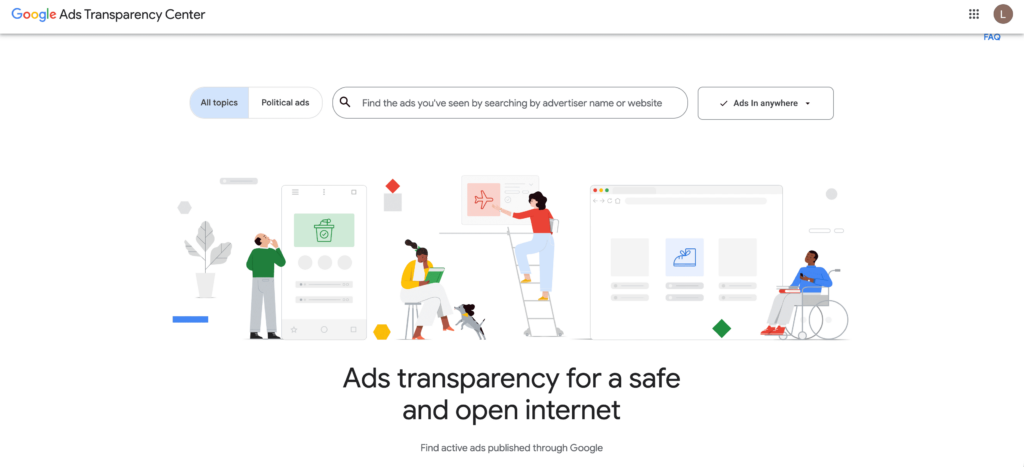
The tool launched in March 2023, partly driven by the EU’s Digital Services Act, which required large platforms to make their ad inventories publicly accessible. It’s also one of the few Google Ads tools that doesn’t require an account to use.
Any active ad from any verified advertiser is indexed and searchable. The database covers the last 30 days for regular ads, so if a competitor paused a campaign five weeks ago, you won’t find it. Political ad retention varies by region. In the EU, it changed significantly in 2025, so historical data there is no longer reliably accessible. Standard commercial ads show creatives, regions, date ranges, and format types. Political ads add spend estimates and audience targeting details.

How to Find and Filter Ads in Google Ads Library
Go to adstransparency.google.com, type an advertiser name or keyword into the search bar, and you’re in. That’s the short version. The longer version is where it gets useful.
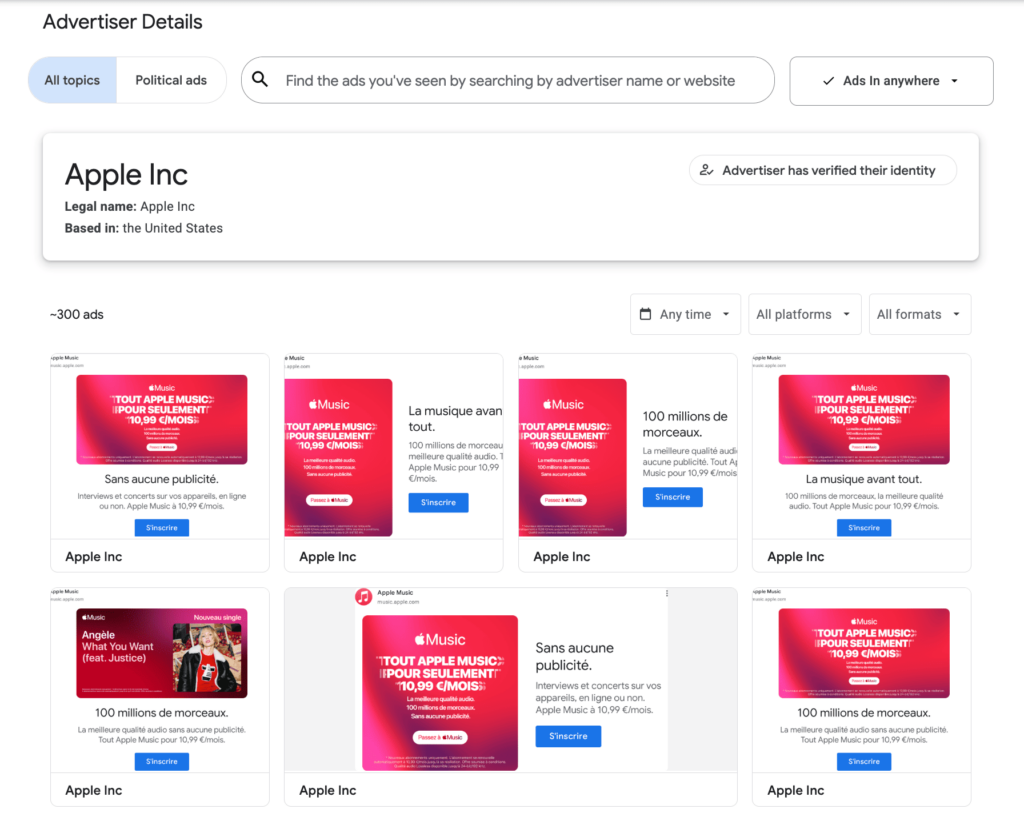
The search works two ways. You can search by advertiser name if you already know who you’re looking at. Or you can search by keyword or topic, which is the underused approach. Type “online casino bonus” or “crypto trading” and you’ll surface ads from multiple advertisers at once, including ones you didn’t know were active in that space. This works for any vertical, whether you’re running PPC campaigns, display, or looking for creative examples to adapt.
From there, the filters let you narrow down by these parameters.
- Country shows what’s running in a specific market.
- Platform narrows results to Search, YouTube, Shopping, Maps, Play, or Gmail.
- Format filters by ad type, either Text, Image, or Video.
- Date range lets you filter by when the ad was first shown or last seen.
- Advertiser narrows results to a specific brand.
One gap worth knowing is that if an advertiser hasn’t completed Google’s verification process, their ads won’t show up at all. It doesn’t happen often, but it means some newer advertisers simply won’t appear in your results.
What Ad Formats and Data Are Available
| Ad Format | Platform | What You See |
| Text | Search | Headlines, descriptions, advertiser name, regions, dates. Limited creative data, since ads are assembled dynamically |
| Image | Display, Shopping | Full creative, advertiser, regions, date range, number of variations |
| Video | YouTube | Full video creative, advertiser, regions, date range, variations |
| Text / Image | Maps, Play, Gmail | Advertiser name, regions, dates, creative where available |
Search text ads are less useful for creative research because Google builds them dynamically from multiple headlines and descriptions, so there is no single fixed creative to look at.
How Affiliates and Media Buyers Use Google Ads Library for Competitor Research
This is where the tool actually becomes useful for competitor analysis and affiliate marketing research. Here are five ways affiliates and media buyers use it.
- Spotting what’s being scaled. An ad that’s been running continuously for 30, 45, 60 days in a competitive niche is almost certainly not a test anymore. Advertisers don’t leave losing creatives live that long. Think of it like a restaurant menu that never changes. They keep those dishes because people keep ordering them. If you see the same Display banner or YouTube pre-roll from a competitor for six weeks straight, that’s a signal worth paying attention to.
- Reading GEO-specific messaging. Filter by country and compare how different advertisers frame the same offer. A betting brand running in Germany might lead with regulatory compliance and odds transparency; the same category in Brazil often leans on bonus size and social proof. These aren’t random choices. They reflect what that market responds to.
- Tracking new entrants. Sort by recently launched ads in a vertical you’re active in. If three new advertisers appeared in the last two weeks pushing similar iGaming offers, something is probably moving in that market, whether that’s a new affiliate program, a seasonal push, or a regulatory window opening up.
- Reverse-engineering funnels. The ad copy and the destination URL you can see in the Transparency Center show you the basic structure of a competitor’s funnel. If an advertiser keeps pushing traffic from a specific angle, for example “no deposit bonus” in Display, to the same landing page, that combination is worth studying before you build your own. The ad tells you the hook; the URL tells you where they’re sending people.
- Auditing your own brand. Use the library to check what your own ads look like from the outside, where outdated creatives and geo-targeting inconsistencies are easier to spot than in the dashboard.
One honest limitation is that Ads Library shows you what’s running, not what’s converting. An ad being live for two months could mean it’s profitable, or it could mean someone forgot to pause it. Check other sources before deciding anything. For finding offers worth running in the first place, AffRoom’s CPA network listings give you a verified starting point.
How to Identify Winning Creatives
The date filter is your main instrument here. Since regular ads only stay in the database while they’re active, the fact that an ad is still showing up today is itself a signal. The more practical method is to bookmark your top competitors, check back every two weeks, and note which ads keep reappearing. If the same creative shows up across three or four of your check-ins, it has been running continuously. Some ad detail pages also display a “first shown” date, which lets you calculate run duration directly. Longevity is the closest proxy for performance you’ll get from this tool.
A few things to check once you find a long-running ad.
- How many variations does it have? Multiple versions of the same concept suggest active testing, not abandonment.
- Is it running in multiple countries or just one? Running across several markets usually means the advertiser is committed to that creative.
- What’s the format? Long-running Display and Video creatives are more actionable for affiliate campaign inspiration than Search ads.
Cross-reference what you find here with offer ideas from AffRoom’s affiliate programs listings to connect creative angles with actual available programs.
Practical Tips to Get More Out of Google Ads Library
A few habits that make a real difference over time:
- Track the same ad over time. When you first spot an interesting creative, note the date. Come back in two weeks. If it’s still there, that’s a good sign. After seeing it a few times over a month, you can assume it’s running on purpose.
- Use silence as a signal. If you filter a GEO and barely find any ads in your vertical, don’t assume it’s an open market. It might mean the channel doesn’t work there, or that everyone moved to a different format. Investigate before you spend. This kind of tracking saves you from wasting budget on campaign optimization in a market that simply doesn’t respond to the channel.
- Pair it with traffic source research. Use AffRoom’s ad network listings to identify which platforms are actually running the types of creatives you’re seeing in the library. Knowing the creative is one thing; knowing where it runs profitably is another.
- Search by domain, not just brand name. Many advertisers run ads under a legal entity name that differs from their brand. Searching by domain (e.g., betway.com instead of Betway) tends to return more complete results and is less affected by name variations across markets.
FAQ
What is Google Ads Library?
Google Ads Library, also searched as Google Ad Library or ad library google, is a public database of active ads running across Google’s platforms. Confirmed coverage includes Search, Display, YouTube, and Gmail, with Shopping, Maps, and Play potentially available depending on region and advertiser. It shows creatives, regions, date ranges, and ad variations for any verified advertiser, with regular ads visible for the last 30 days.
How to use Google Ads Library?
Go to adstransparency.google.com, search by advertiser name or keyword, then use filters for country, ad format, and date range to narrow down results. No account or login required.
What is the difference between Google Ads Library and Google Ads Asset Library?
Google Ads Library is a public research tool for viewing any advertiser’s active ads. Google Ads Asset Library is a private section inside your own Google Ads account for managing your own campaign creatives.
Can you see competitor ads in Google Ads Library?
Yes. You can see their active creatives, the regions they’re targeting, and how long the ads have been running. Performance data, such as clicks and conversions, is not available for any ad type. For political ads, Google does show estimated spend ranges, but that’s the extent of it.
Is Google Ads Library free to use?
Completely free, no account needed. For a broader research workflow, finding verified CPA networks, ad networks, and affiliate programs to match your creative findings to real offers, AffRoom is also free to join.
Conclusion
In short, Google Ads Transparency Center is not just a place to browse competitor ads — it’s a practical tool for structured research: creatives, GEO angles, new entrants, and scaling signals. But it only shows what’s running, not what’s actually converting.
To turn this into a real competitive advantage, you need more context, deeper breakdowns, and a consistent flow of insights. That’s where AffRoom Media comes in — a place to keep learning, track trends, and sharpen your approach based on what actually works in affiliate marketing.