CPA Networks
 Ad Networks
 Affiliate Programs
 Offer base



Pop traffic has always come with the same trade-off: the volume is there, but so is everything that rides along with it. Buyers who scale a popunder campaign fast usually pay for it later — in junk clicks, in spend that never reaches a real user, in tracking that falls apart the moment cookies are involved.
Remoby is built around the claim that the trade-off isn’t mandatory. It’s an advertising platform for performance marketers specializing in Onclick (Pop) and Engagement ad inventory, processing 10B+ daily ad impressions across 195+ countries, with major pop traffic sources connected into a single buying point.
This review breaks down Remoby’s two live ad formats, its three buying models, how traffic is filtered before it reaches your landing page, and what campaign setup, conversion tracking and bid research actually look like inside the dashboard.
Built by AffRoom, a knowledge base for affiliates and ad & CPA networks — so once you’ve weighed Remoby against your current traffic mix, you can browse our other ad network reviews and line up offers to run through it.
What Is Remoby?
Remoby’s pitch is straightforward: scale shouldn’t cost you traffic quality. The platform connects major pop traffic sources into a single buying point, processing 10B+ daily ad impressions across 195+ countries.
Instead of reselling raw, unsorted volume, Remoby reads the behavioral signals behind every click and sorts traffic into structured audiences that advertisers can target directly. Before a click reaches a landing page it passes through the same pipeline every time:
- anti-fraud policies
- AI-based scoring
- manual review
The result is meant to be GEO-wide reach without the usual quality trade-off, across both Onclick and Engagement inventory.
Remoby Ad Formats
Campaign creation opens with a format picker that lays out the difference between the two live formats clearly — plus two formats marked “soon”.
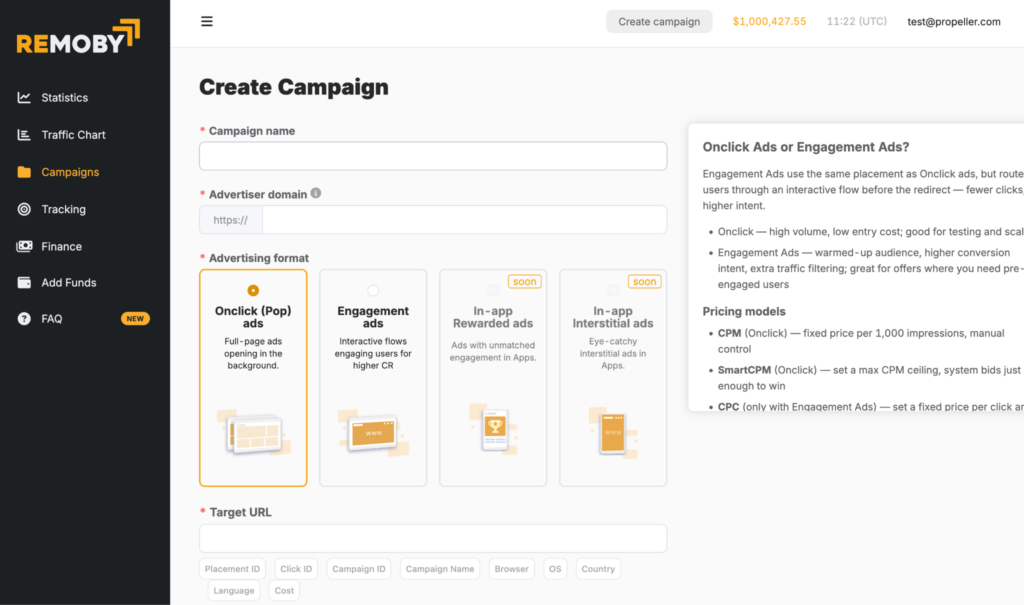
Onclick (Pop) Ads
Full-page ads that open in the background as the user browses. This is the high-volume, low-entry-cost option — the platform’s own guidance frames it as best for testing and scaling offers quickly across large traffic volumes.
Best for: iGaming, eCommerce, FinTech, Social, Mobile Apps.
Engagement Ads
Engagement Ads use the same placement as Onclick ads but route the user through an interactive flow before the redirect. That extra step means fewer clicks overall, but a warmed-up, higher-intent audience — Remoby applies extra traffic filtering on this format, which pushes conversion rates up. It’s built for offers where pre-engaged users matter more than raw reach.
Best for: iGaming, Mobile Apps, FinTech, Social.
Coming Soon
Two additional in-app formats are already listed in the campaign creation flow, marked “soon”:
- In-app Rewarded Ads — ads with unmatched engagement inside mobile apps
- In-app Interstitial Ads — eye-catchy interstitial placements inside apps
Buying Models
Remoby’s pricing sidebar, shown at campaign creation, breaks down three models:
- CPM (Onclick) — fixed price per 1,000 impressions, manual control over bids
- Smart CPM (Onclick) — you set a max CPM ceiling and the system bids just enough to win the impression, avoiding overpaying
- CPC (Engagement Ads only) — a fixed price per click, available specifically for the Engagement format
This gives advertisers a clear split: Onclick campaigns are priced and controlled at the impression level, manually or via Smart CPM, while Engagement campaigns — where each click already reflects a filtered, higher-intent user — are priced per click.
Setting Up a Campaign
Campaign creation follows a single-page flow rather than a multi-step wizard:
- Campaign name — a free-text label for your own reference.
- Advertiser domain — the domain the campaign will run traffic to.
- Advertising format — choose Onclick (Pop) or Engagement Ads, with In-app Rewarded and In-app Interstitial listed as upcoming options. A side panel explains the trade-offs between formats and pricing models on the same screen.
- Target URL — the landing page or offer URL, with macro support for Placement ID, Click ID, Campaign ID, Campaign Name, Browser, OS, Country, Language and Cost — enough granularity to pass full context to your tracker for post-campaign analysis.
Conversion Tracking
Remoby uses a server-to-server (S2S) postback, described in the platform as cookie-free, block-proof and accurate. Setup is a four-step process:
- Copy the S2S postback URL — a unique URL where the source parameter identifies your account.
- Replace the macros in the URL —
{ClickID}sends the conversion to Remoby’s tracker,{amount}sends the conversion cost, and{trx}sends a unique event/transaction ID. - Paste the completed URL into your tracker or CPA network’s postback settings.
- Verify that test conversions are firing correctly.
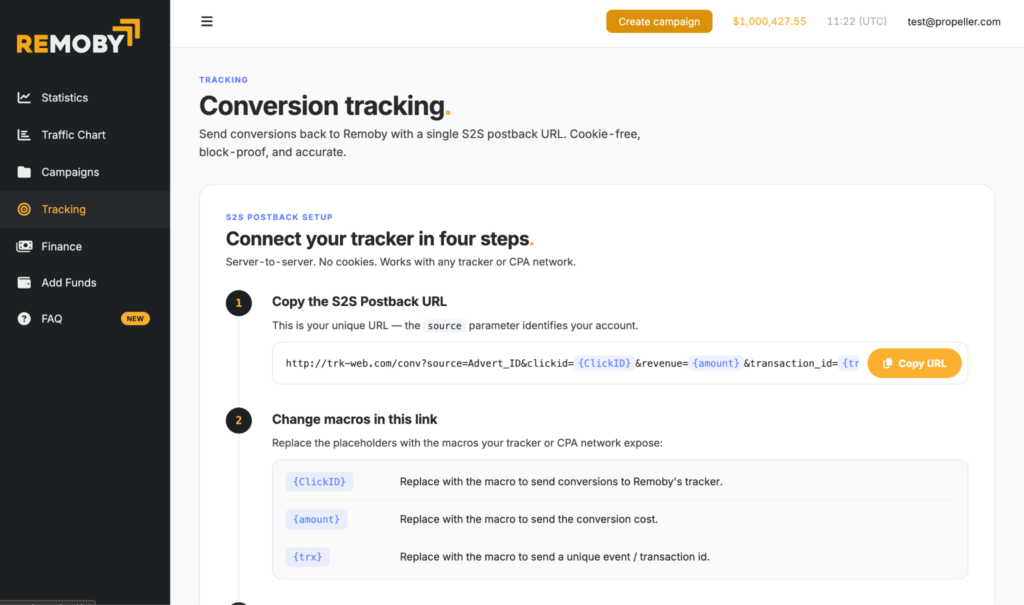
Because it’s a standard S2S postback rather than a proprietary SDK, this setup works with any tracker or CPA network — no cookie dependency to worry about on GDPR-sensitive traffic.
Remoby Traffic Chart
One of the more useful advertiser-facing tools is the live Traffic Chart, filterable by Country, Platform, OS and Browser, and split into separate tabs for Pop Ads and Engagement Ads. It shows yesterday’s approximate traffic activity, including total impressions, Max CPM Rate, and an “Optimal CPM Rate” — a suggested bid to be competitive without overpaying.
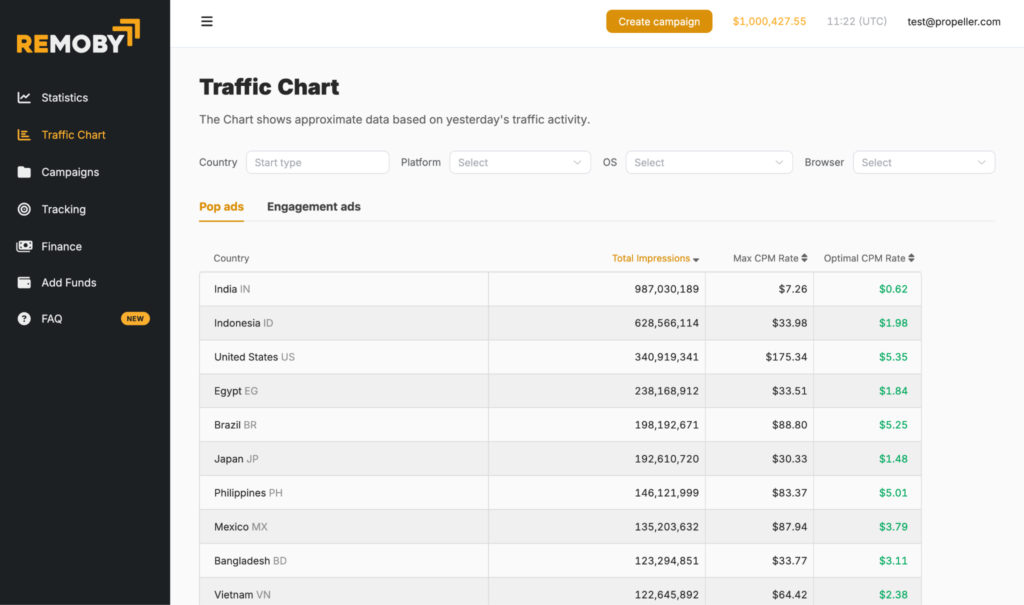
A snapshot of Pop Ads volume by top country looked like this:
| Country | Total Impressions | Max CPM Rate | Optimal CPM Rate |
|---|---|---|---|
| India | 987,030,189 | $7.26 | $0.62 |
| Indonesia | 628,566,114 | $33.98 | $1.98 |
| United States | 340,919,341 | $175.34 | $5.35 |
| Egypt | 238,168,912 | $33.51 | $1.84 |
| Brazil | 198,192,671 | $88.80 | $5.25 |
| Japan | 192,610,720 | $30.33 | $1.48 |
| Philippines | 146,121,999 | $83.37 | $5.01 |
| Mexico | 135,203,632 | $87.94 | $3.79 |
| Bangladesh | 123,294,851 | $33.77 | $3.11 |
| Vietnam | 122,645,892 | $64.42 | $2.38 |
Figures are a point-in-time snapshot from the Remoby dashboard and shift daily — always check the live Traffic Chart before setting bids.
This kind of transparency is genuinely useful for media buyers: instead of guessing at a starting CPM, you can see both the ceiling (Max CPM) and a data-backed suggested bid (Optimal CPM) per GEO before you launch.
Platform Interface
The Remoby dashboard is organized around a compact left-side menu:
- Statistics — campaign-level performance reporting
- Traffic Chart — the live GEO/CPM tool described above
- Campaigns — campaign management and creation
- Tracking — S2S postback setup
- Finance — balance and billing history
- Add Funds — deposit management
- FAQ
The layout is minimal and uncluttered — there’s no feature sprawl to dig through, which makes it easy for advertisers to get from sign-up to a live campaign quickly.
Remoby Use Cases by Partner Segment
Remoby structures its offering around four main partner segments:
- Mobile Apps — driving installs for utility, dating and social apps through inventory beyond the reach of major ad channels.
- iGaming — controlling CPL and FTD costs with custom funnels built on entertainment inventory, a segment where Remoby’s fraud filtering and GEO flexibility matter most.
- Brand Awareness — full-screen formats combined with retargeting for low-cost clicks at global scale.
- Search — clicks routed to branded SERPs, supporting search arbitrage strategies.
For affiliates and media buyers running iGaming or betting offers specifically, this segment-first approach is a good sign — it suggests Remoby’s targeting and anti-fraud stack were built with high-risk verticals in mind, not bolted on afterward.
Remoby at a Glance
| Feature | Details |
|---|---|
| Reach | 10B+ daily ad impressions |
| GEO | 195+ countries |
| Ad formats | Onclick (Pop) Ads, Engagement Ads — In-app Rewarded and In-app Interstitial coming soon |
| Buying models | CPM, Smart CPM (Onclick); CPC (Engagement Ads only) |
| Verticals | iGaming, eCommerce, FinTech, Mobile Apps, Social, Direct Search |
| Market segment | Advertisers (performance marketers, affiliates, media buyers) |
| Tracking | S2S postback — cookie-free, works with any tracker or CPA network |
| Traffic quality | Anti-fraud policies, AI-based scoring, manual review |
Remoby Pros and Cons
Pros
- Massive scale: 10B+ daily impressions across 195+ countries
- Two clearly differentiated formats — Onclick for volume and testing, Engagement for pre-filtered, higher-intent traffic
- Transparent, live Traffic Chart with per-GEO impressions and suggested CPM — rare visibility for a pop network
- Simple S2S postback tracking that works with any tracker, no cookies required
- Smart CPM bidding to avoid manual overpaying
- Clean, minimal dashboard with a short learning curve
- Segment-specific focus on iGaming, FinTech and Mobile Apps
Cons
- Only two live formats today; In-app Rewarded and In-app Interstitial are still marked “soon”
- CPC pricing is only available on the Engagement format, not on Onclick
- Publicly available information on minimum deposit and payment methods is limited — best confirmed directly with the Remoby team before funding an account
Who Remoby Is a Good Fit For
Remoby is aimed at media buyers and affiliates in iGaming, eCommerce, FinTech, Mobile Apps, Social and Direct Search who want structured, filtered traffic rather than unsorted pop volume — and who already know their way around pop traffic well enough to make use of per-GEO CPM data instead of guessing at bids.
It’s a less obvious fit for buyers who need in-app inventory right now, since both in-app formats are still upcoming, or for anyone who wants CPC pricing on Onclick campaigns specifically — that model is reserved for Engagement Ads.
Remoby FAQ
What is Remoby?
Remoby is an advertising platform for performance marketers specializing in Onclick (Pop) Ads and Engagement Ads, with 10B+ daily impressions across 195+ countries.
What’s the difference between Onclick and Engagement Ads?
Onclick ads are full-page ads opening in the background — high volume and low entry cost, good for testing and scaling. Engagement Ads route users through an interactive flow first, trading some volume for a warmed-up, higher-intent, more filtered audience.
What buying models does Remoby support?
CPM and Smart CPM for Onclick campaigns, and CPC for Engagement Ads campaigns.
How do I set up conversion tracking?
Copy your unique S2S postback URL from the Tracking tab, replace the {ClickID}, {amount} and {trx} macros with your tracker’s equivalents, and paste it into your tracker or CPA network’s postback settings — no cookies involved.
How can I find the best-performing GEOs?
Check the live Traffic Chart inside the dashboard, filterable by country, platform, OS and browser, with both a Max CPM Rate and a suggested Optimal CPM Rate per country.
Who should use Remoby?
Media buyers and affiliates in iGaming, eCommerce, FinTech, Mobile Apps, Social and Direct Search who want structured, filtered traffic rather than unsorted pop volume.
The Bottom Line
Remoby’s core pitch is pop-network scale without pop-network traffic-quality problems. In practice, that shows up in three concrete places inside the dashboard: a format split that lets you choose between raw volume (Onclick) and pre-filtered intent (Engagement), a transparent Traffic Chart that removes the guesswork from bidding, and a tracking setup simple enough to connect in four steps with any tracker.
Combined with a segment-first structure around iGaming, FinTech and Mobile Apps, Remoby looks built for affiliates who already know their way around pop traffic and want more visibility and control than a typical volume-first network offers. For media buyers currently running pop or engagement campaigns elsewhere, it’s a reasonable network to test against your existing mix — and, as with any new traffic source, the sensible approach is a controlled test budget on one GEO before scaling.