CPA Networks
 Ad Networks
 Affiliate Programs
 Offer base



TikTok ads library is, without a doubt, one of the most underrated tools for affiliates and
media buyers looking to dive deep on what’s really working, instead of what people are saying.
The article by AffRoom shares a TikTok Creative Center ads library overview. From discussing what it actually is and places to find it to how you can use it to improve your ROI and more.
AffRoom is a catalogue of affiliate marketing companies and a unique networking platform for both companies and affiliates. Here you can find and connect with iGaming leaders, solo affiliates, advertising, affiliate and CPA networks in one place. It’s also a free offer-base as well as a transparent listing with blunt, honest reviews. Some of our useful sections include:
- Ad Networks
- Affiliate Programs
- CPA Networks.
Now back to the TikTok ads library.

TikTok Ads Library: What Is It?
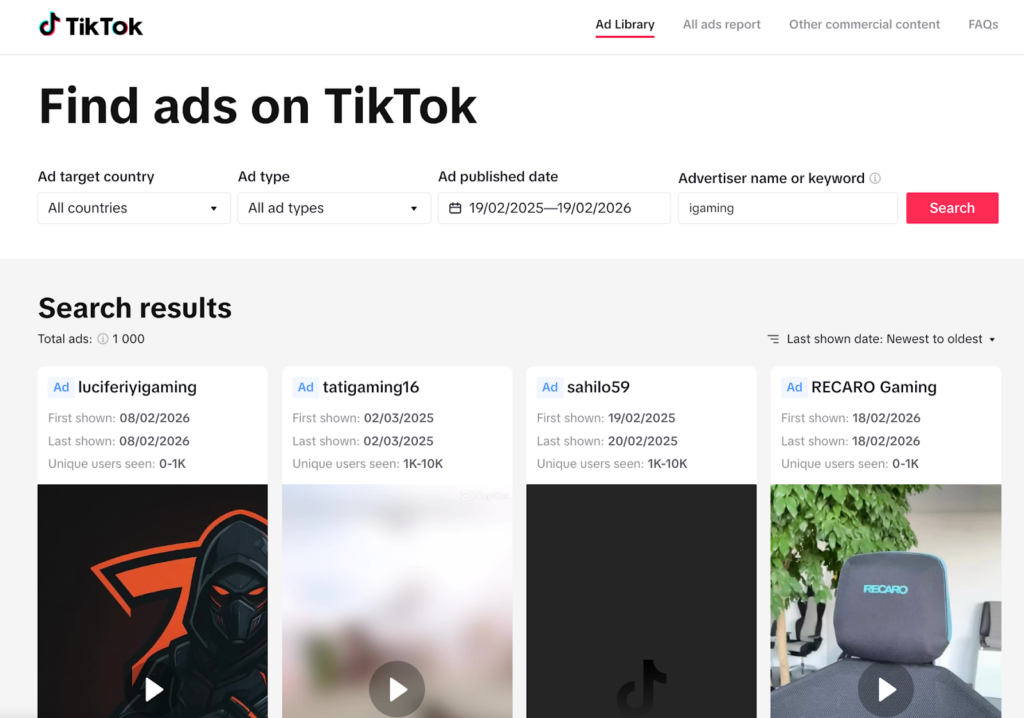
TikTok ads library is TikTok’s official ad inspiration and research hub. What does that mean? There, you browse real ads that just ran recently or are currently running. You can also filter your search by specific industry, format, region or even format. What else can you do? Reverse engineer what’s really performing.
If you are doing competitor analysis, are on the lookout for patterns to help you scale, or conducting creative research, this is a primary tool that you shouldn’t overlook.

Why Do Media Buyers Use TikTok Ads Library?
Media buyers utilize it because of the following:
- Targeting is broad on TikTok. And, the algorithm figures it out, actually: So the edge here is just creative. Moreover, the ads library shows media buyers how fast pacing needs to be. What call-to-actions are used in conversion campaigns? The most trending visual styles, plus the hooks, are grabbing attention. This means that, instead of guessing, as a media buyer, you are starting right from patterns that are already working.
- Hunting the Top Trends: Well, TikTok is fast-paced. Everything there moves fast. Meaning? What worked three days ago may already be dead. So with the Creative Center, media buyers can see Top performing ad formats. Trending hashtags, Keyword insights. Sounds that are trending. This is a plus, especially for arbitrage teams. If one catches trends early, they can enjoy cheaper CPMs and creatives that feel native instead of forced.
- Competitor Intelligence: Competitors are always testing constantly, especially on verticals like Dating, Finance, iGaming and E-commerce. With the TikTok ads library, inside the Creative Center, media buyers have the privilege to filter by objective (that goes for App installs, Conversions, Traffic, etc.), region and industry. That gives them a simple and helpful overview of what exactly is scaling in their GEO.
Where Can You Find the TikTok Ads Library?
TikTok ads library is an integrated function that can be found inside TikTok for Business under the Creative Center Section (the main place to find ads library TikTok). The Creative Center Section can be accessed mainly via the TikTok for Business website (on mobile browser or desktop). Below, AffRoom team will discuss the two methods for a better understanding:
1. Using your Mobile Browser on Your Phone to Access TikTok Library Ads Via the TikTok for Business Website
Entails using a mobile browser and not the standard TikTok App people use to watch and post videos. The creative center is usually web-based, so when you open it on your phone, you are just accessing the same platform but now in mobile view.
From the creative center section, you’ll find a Top Ads dashboard. Explore TikTok creative center ads library features like filters based on elements like industry, GEO and objective. There are also engagement indicators, brand and product trends discovery in some regions, creator analytics, trends, keyword insights and a breakdown of ad format.
- Open your preferred mobile browser( examples include Chrome & Safari)
- Go to ads.tiktok.com/open the TikTok ads library official site
- Log in to your TikTok Business account
- Tap the menu and select “Creative Center”
- Click on Top Ads
- Proceed to apply filters as you wish
The downsides of using the mobile browser method are that it’s not as comfortable as using a desktop. Navigating and filtering may feel somewhat compressed. It may be tricky to analyze some advanced insights on mobile.
2. Accessing Tiktok Ads Library Through Tiktok for Business Website (Using your Desktop).
We consider this as the most comfortable and also common method for accessing TikTok Library Ads, especially for media buyers and the likes, looking to perform serious ad research and filtering. What to do:
- Open your browser on your desktop
- Type ads.tiktok.com/tiktok ads library URL in the browser’s search section to open the website
- After it opens, log in to your TikTok Business account
- Click “Creative Center” from the top navigation bar
- Select Top Ads and filter your search
For quick research on the go, use your mobile browser. But for a serious breakdown and scaling analysis, consider using your desktop.
How to Effectively Use TikTok Ads Library for Campaigns
- First, have a clear goal in mind: Before anything else, clarify what it is you want from the ads library. For example, are you just looking for creative inspiration or seeking to understand your competitors’ strategies in your GEO? Once you know your goal upfront, it becomes easy to filter the data and also avoid wasting time scrolling through random ads.
- Strategically use filters: Check your Geo first, then see which vertical creative performs best. Filter by the niche you are running, data range ( focus mostly on fresh ads to spot current trends). Match the campaign objective with the current stage of your funnel.
- Ensure you study the Hook: Normally, the first few seconds determine if the user will keep watching. So, when analyzing top ads, pause at the first second, identify the hook type (is it an overlay, shocking visual, a face or product first approach, direct question). Confirm if the clips are fast-cut or slow. Also, observe if the ad uses trend sounds or hashtags.
- Break down the ads structure: Reverse engineer the ad structure to better understand why an ad converts, having in mind that TikTok ads tend to follow a repeatable pattern. When doing the breakdown, look for hook, pain point, agitation, solution, social proof and Call to Action and make a checklist of these elements for every Top Ad you analyze.
- Make an observation of engagement signals: This includes observing metrics such as likes, shares, and comments, which all help hint at what resonates with audiences. However, note that high likes don’t really guarantee profitability. Some high-converting campaigns have low visible engagement. Also, look at engagement to identify ad fatigue patterns as well as vitality potential.
- Have a swipe file: Every ad you analyze, ensure you save the script ideas, visuals, angles, ad formats, hashtags, sounds and hooks. Over time, the swipe file will help you notice patterns specific to your Geography plus vertical, becoming your creative playbook that reduces testing time.
- Test and Iterate quickly: TikTok algorithm mostly rewards fast iteration. So what do you do after spotting winning trends and creatives? Create five to ten variations of your angle or hook. Launch small test campaigns. Measure CTR, CPI + ROAS. Kill the underperforming creatives as fast as you can and scale the winning ones aggressively.
FAQ on Tiktok Ads Library
1. What is TikTok ads library?
It is an official ad research section inside TikTok’s Business Creative Center that allows affiliates and advertisers to browse and even analyze real ads running across regions and industries. It also helps in understanding what’s currently performing on the platform.
2. How to access TikTok ads library?
Visit the TikTok Creative Center on the TikTok for Business website (ads.tiktok.com), log in, open the creative center then navigate to the Top Ads section, where you can start filtering ads.
3. Is the TikTok ads library free to use?
Yes, the TikTok ads library is free to use. You only need a TikTok business account for full functionality.
4. What data can you see in the TikTok ads library?
You can see ad creative, industry tags, regions, engagement signals and objectives. Sometimes you’ll see trend-related insights like popular hashtags and sounds.
5. How do affiliates use the TikTok ads library for ad research?
Affiliates use the TikTok ads library for ad research to reverse engineer winning hooks, reduce the cost of testing before launching campaigns and identify trends early.